CoreGolf Round Tracking Guide
📏 How to Fold Your Scorecard for a Yardage Book
Our scorecard is laid out in a 3×3 grid so it can be folded down into a compact pocket strip matching the exact dimensions of standard tour yardage book holders:
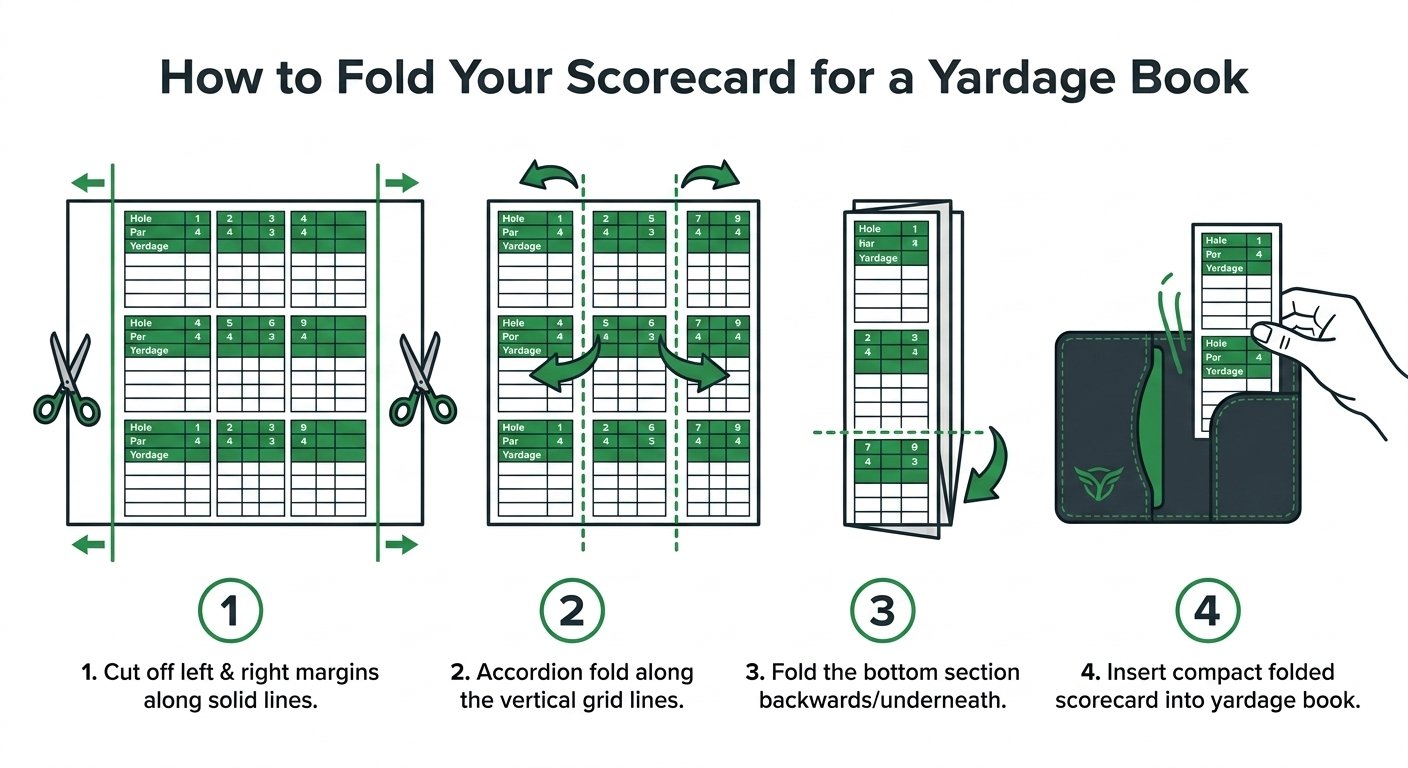
- Print Double-Sided (Landscape): Print on standard letter paper (8.5" × 11") in landscape orientation. Page 1 is the Front 9; Page 2 is the Back 9.
- Trim the Left & Right Margins: Use scissors or fold back the blank white margins on the left and right edges so the paper aligns flush with the grid lines.
- Tri-Fold into Thirds (Vertical): Fold the paper vertically into thirds along the lines separating the 3 columns. You now have a slim 3.6-inch wide strip displaying 3 holes at a time (Holes 1–3, 4–6, or 7–9).
- The Yardage Book Tuck: Fold the bottom hole under along the horizontal line. Your card is now a compact 3.6" × 5.5" booklet that slides directly into any standard leather yardage book cover or back pocket. Flip the folds as you complete each 3-hole stretch!
1. The Four Golden Rules of CoreGolf Tracking
Before teeing off, keep these four fundamental principles in mind for flawless tracking and AI transcription:
- Distance on Turf is in YARDS: Whenever you hit from the Tee, Fairway, Rough, Sand, or Recovery, record the distance to the hole in yards.
- Distance on the Green is in FEET: All putts and chips on the putting surface are recorded in feet (e.g., write
18for an 18-foot putt). - Every Hole Must End with [H]: Circle the
Hon the exact shot that drops into the cup. Every finished hole requires exactly one holed shot. - The Scorecard Math Check: Your recorded physical shots plus any circled penalty strokes
[P]must equal your total hole score.
2. Visual Walkthroughs: Three Example Holes
Study these three real-world examples to see how every scoring scenario is marked on the physical card:
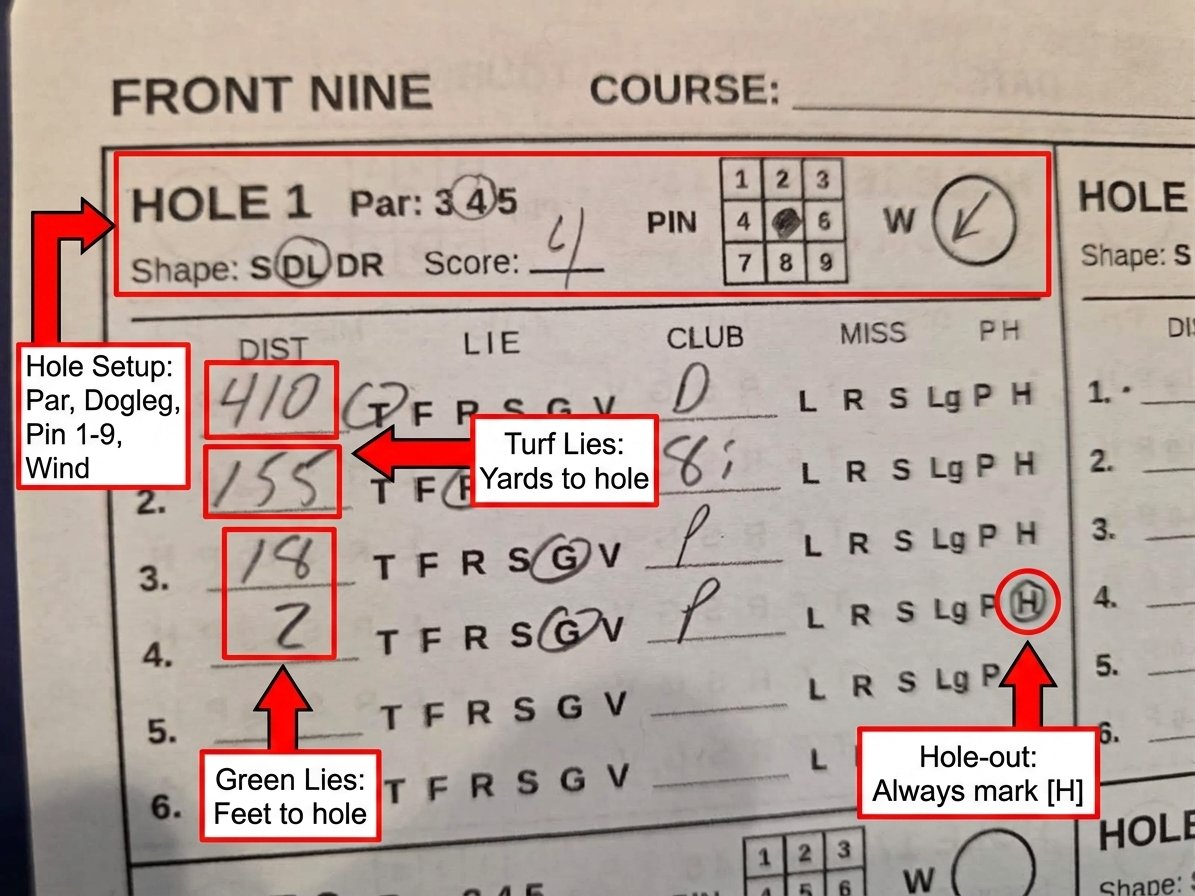
Figure 1: Standard Regulation Play (Clean Par)
A standard Par 4 played from tee to green with zero penalties or hazards.
How It Was Logged:
- Hole Setup: Par
4circled, Dogleg LeftDLcircled, Pin is in position5(center), and wind arrow is pointing SW into the player. - Shot 1:
410yards from the Tee[T]with Driver (D). Landed in the rough 155 yards out. - Shot 2:
155yards from the Rough[R]with an8ionto the green, 18 feet from the cup. - Shot 3:
18feet on the Green[G]with Putter (P) down to 2 feet. - Shot 4:
2feet on the Green[G]with Putter (P) holed out ([H]circled). - Score Check: 4 shots recorded = Score 4.
Figure 2: Scramble & Directional Misses (Bogey from Sand)
Illustrates how to record directional misses and greenside bunker recovery.

How It Was Logged:
- Directional Miss (Shot 1): Drive sliced right into the rough;
[R]is circled underMISS. - Diagonal Miss (Shot 2): 7-iron missed short and left into a greenside bunker; both
[L]and[S]are circled underMISS. - Sand Lie (Shot 3): 18-yard bunker shot out of the sand;
[S]is circled underLIE. Landed on the green 6 feet from the hole. - Green Putts (Shots 4 & 5): 6-foot putt missed to 1 foot; 1-foot putt holed out (
[H]circled). - Score Check: 5 shots recorded = Score 5.
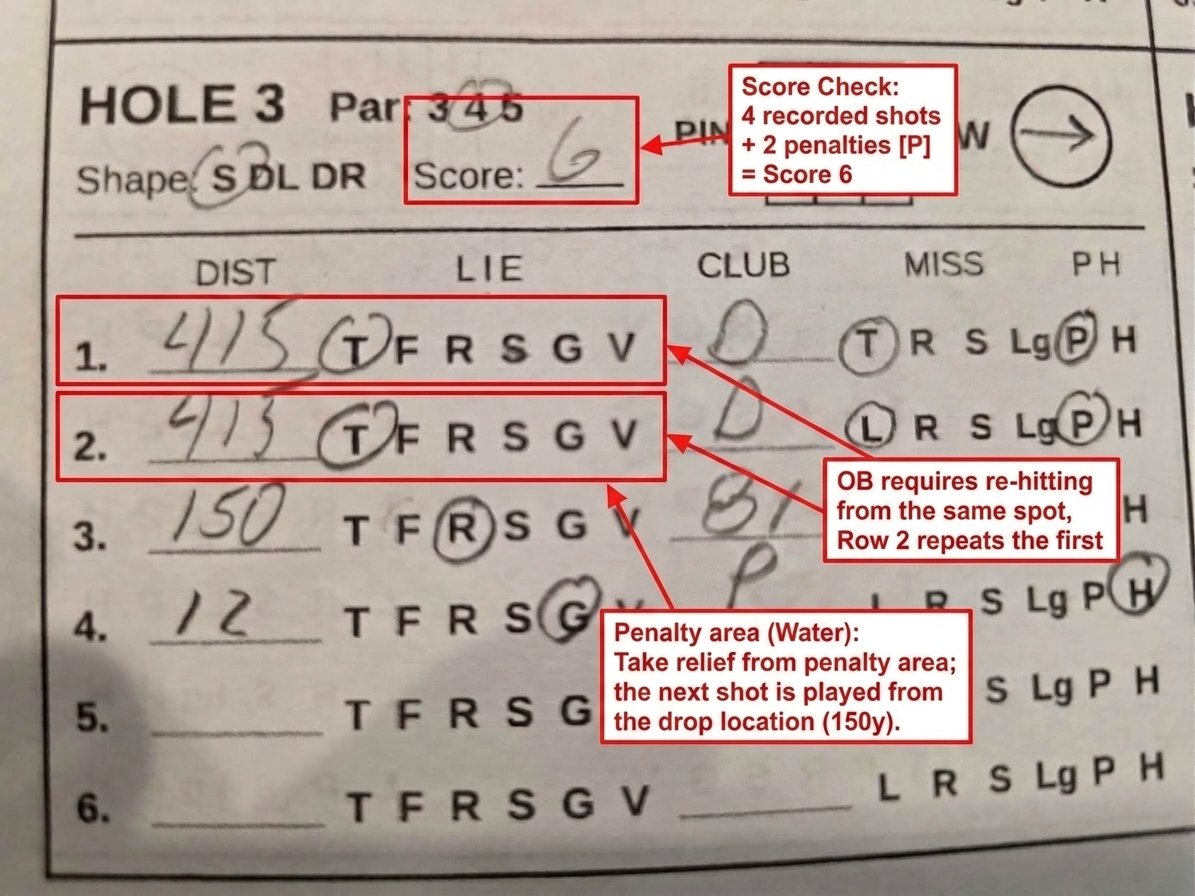
Figure 3: The Penalty Masterclass (Out of Bounds vs. Water Hazard)
Demonstrates how to record Stroke-and-Distance penalties (OB) versus Hazard Relief drops.
How It Was Logged:
- Stroke & Distance (OB - Shot 1): First tee shot hooked Out of Bounds. Mark
[P]for the penalty stroke. Under golf rules, OB requires re-hitting from the same spot. - Re-Tee (Shot 2): Re-hit from the tee box; distance is repeated (
415yards from[T]). The ball hooked into a penalty area (water); mark[P]for the second penalty. - Relief Drop (Shot 3): Penalty relief taken outside the hazard. The next shot is played from the drop location (
150yards from the[R]) onto the green, 12 feet away. - One-Putt Holed (Shot 4): 12-foot putt holed out (
[H]circled). - Auditor Math Check: 4 physical swings + 2 penalty strokes
[P]= Score 6. The app's Red Card auditor matches the math with 0 errors.
3. The Official Scorecard Abbreviations
| Field | Code | Meaning / Usage |
|---|---|---|
| Lies | T | Tee Box: Used for Shot 1 on every hole. |
| Lies | F | Fairway: Standard fairway lies and tightly mown fringe collars. |
| Lies | R | Rough: Intermediate or primary rough turf. |
| Lies | S | Sand: Greenside or fairway sand bunkers. |
| Lies | G | Green: Putting surface. Distance is recorded in feet. |
| Lies | V | Recovery: Punch-outs, deep woods, or obstructed lies. |
| Misses | L / R | Shot missed to the Left or Right of intended target. |
| Misses | S / Lg | Shot missed Short or Long of intended target. |
| Status | P | Penalty: Adds 1 penalty stroke to hole total (OB, water, lost ball). |
| Status | H | Holed: The shot that drops into the cup. Required once per hole. |
4. Pin Grid & Wind Directions
The 1–9 Pin Grid: Divide every green into 9 sectors (Back/Middle/Front × Left/Center/Right). 1 is Back-Left, 5 is Dead-Center, and 9 is Front-Right. Circling the pin location powers the app's Short-Sided Miss Penalty calculations.
The Wind Compass (W): Draw an arrow inside the circle indicating the direction the wind is blowing relative to your tee shot. Pointing straight UP means a helping TAILWIND (blowing forward toward the green); pointing straight DOWN means a HEADWIND (blowing back in your face).
5. AI Vision Scanning & Troubleshooting Protocol
CoreGolf's vision engine uses multimodal AI (Google Gemini 2.5 Flash) to parse an entire 9-hole or 18-hole scorecard sheet in under 4 seconds. Follow these best practices to ensure seamless transcription on your first scan:
📸 Photographic Best Practices for AI Accuracy
- Pencil Pressure & Contrast: Standard wooden golf pencils work cleanly. Simply write your distances and circle selections with firm, dark pressure rather than faint, light scratches so the camera sensor picks up clear edge contrast.
- Camera Flash OFF (Eliminate Graphite Glare): Highly reflective graphite pencil markings will wash out if direct camera flash bounces off the page. Always keep your phone's camera flash turned OFF and photograph under natural or indirect room lighting.
- Flat Surface Alignment: Unfold the scorecard flat on a table. Smooth out the center fold creases so the numbers and grid boxes do not curve away from the lens.
- Full Frame Visibility: Ensure all 4 outer corner borders of the 9-hole grid are visible inside your phone's camera viewfinder. Do not crop off the top hole headers or the bottom holed-out status circles.
- Eliminate Casting Shadows: Position your phone directly above the card at a 90° angle. If your body casts a shadow over Holes 4–6, tilt the card toward a window or indirect light source.
The "Photo is sideways?" Toggle: Modern phone cameras (especially Samsung and Google Pixel devices) occasionally save landscape photos with an inverted EXIF orientation tag. If your scorecard image preview loads rotated 90 degrees in the app, toggle "Photo is sideways?" ON before tapping Analyze Scorecard. This instructs the vision engine to rotate the image buffer prior to OCR parsing.
Deterministic Hole Normalization (1–9 vs. 10–18)
CoreGolf enforces strict code-level hole normalization. When scanning a full 18-hole round:
- Sheet 1 (Front 9): The engine strictly isolates Holes 1 through 9.
- Sheet 2 (Back 9): Even if your course scorecard prints the Back 9 with hole numbers labeled 1–9, selecting Back 9 or Full 18 automatically applies a +9 offset, cleanly remapping them to Holes 10–18 with zero duplicate hole conflicts.
- Shotgun Starts: You never have to reorder your scorecard. If your tournament group tees off on Hole 14, simply write your shots in the designated Hole 14 box on the Back 9 sheet. The AI vision engine reads each hole independently by its printed and written hole number, assembling your complete round in sequential 1–18 order regardless of what order you played them on the course!
Scanner Troubleshooting Matrix
| Symptom | Root Cause | Instant Solution |
|---|---|---|
| Holes Extracted as "0" or Skipped | Image preview loaded rotated sideways or upside down. | Turn ON the "Photo is sideways?" switch and re-scan. |
| Distance Parsed Incorrectly or Blurry | Camera flash or overhead LED glare bouncing off graphite markings. | Retake photo with camera flash OFF under indirect natural light, ensuring numbers are written firmly. |
| Duplicate Hole Numbers (e.g., Two Hole 1s) | Scanning Back 9 with "Front 9" selected. | Select the Back 9 tab at the top of the scanner before capturing. |
| Red Auditor Flags After Scan | Math check: shots logged do not equal written hole score. | Tap the red card in Round Review. The app highlights the exact missing putt or penalty stroke to verify in 5 seconds. |
6. Rapid-Fire Manual Round Entry & The Green Chain Reaction
If you play in twilight without a paper card, or play a course without physical scorecards, you can enter an entire 18-hole round manually in under 15 minutes using CoreGolf's automated shortcuts:
⚡ The Rapid Entry Shortcuts
- GIR-Based Auto-Provisioning: In the Round Review screen, setting a hole's score automatically stubs out all regulation shots for that hole (e.g., Par 4, Score 4 automatically generates: Shot 1 = Driver from Tee, Shot 2 = Fairway, Shot 3 = Putter on Green, Shot 4 = Putter Holed). You only need to type the distances!
- The Green Chain Reaction: Once a shot lands on the putting surface (Lie: G or Club: P) or follows a greenside chip under 30 feet, CoreGolf permanently locks all subsequent shots on that hole to Green and Putter. You never have to re-select lie or club for follow-up putts.
- Unified Hole Dialog: Tapping any hole header opens the Master Editor, allowing you to edit Par, Score, Dogleg Shape (DL/DR/S), 3×3 Pin Position, and Wind Compass simultaneously in a single 1-tap screen.
7. Putting Gate Drill Setup & On-Screen Calibrator
CoreGolf's putting gate engine evaluates real-world face-angle error tolerances from ±2.68° down to a Tour-caliber ±0.14° window. You can calibrate this drill on any practice green using standard tees or any commercial putting gate.
📱 Zero Guessing: The In-App Screen Ruler: Don't have a tape measure on the green? Open Putting Drills in the app and tap "📐 Open Screen Ruler to Set Tees". CoreGolf detects your phone's physical hardware pixel density (ydpi) to project exact physical notch lines directly along the right border of your phone screen. Simply lay your phone flat on the turf, align your tees against the glowing green notches on the glass edge, push them into the green, and lift your phone. You have Tour-caliber gate precision in 5 seconds!
📐 Physical Gate Specifications & Launch Windows
- Distance to Gate: Insert two tees into the green exactly 7-3/4 inches (roughly the length of a putter grip) in front of the center of your golf ball.
- Choose Your Difficulty Level: Adjust the gap between the two tees (inside edge to inside edge) based on your target tolerance:
- Level 0 (Warm-Up): Gap =
2-13/32"(~2.40") — Launch Window: ±2.68° (1 pt/make) - Level 1 (Amateur): Gap =
1-15/16"(~1.94") — Launch Window: ±0.95° (3 pts/make) - Level 2 (Scratch): Gap =
1-7/8"(1.875") — Launch Window: ±0.72° (5 pts/make) - Level 3 (PGA Tour): Gap =
1-25/32"(~1.78") — Launch Window: ±0.37° (8 pts/make) - Level 4 (Laser Precision): Gap =
1-23/32"(~1.72") — Launch Window: ±0.14° (14 pts/make — only a 1/32" margin per side!)
- Level 0 (Warm-Up): Gap =
- Score Your Reps: Log your makes in the app to calculate your mechanical points and track your start-line trendline over time.